
How Many Images Does Your Brand Actually Need?
It’s one of the most common questions we get from new clients: ‘How many images should we get?’ And our honest answer is always: it depends — but we can give you a framework.
The wrong approach is to just pick a round number. The right approach is to map your image needs to your actual distribution channels, then build a shot list that covers all of them efficiently.
Start With Your Channels, Not a Number
Before counting images, list every place your product will live visually:
- Product detail pages (your website, Amazon, retailer portals)
- Social media (Instagram feed, Stories, Reels thumbnails, Pinterest)
- Email marketing (header images, product callouts, promotional banners)
- Paid advertising (Meta, Google Shopping, display)
- Press and editorial (PR kits, media requests)
- Packaging, inserts, and print collateral
Each channel has different specs, crops, and emotional registers. An image that works beautifully on your website may be completely wrong for a square Instagram post or a tall Pinterest pin.
Read more: Understanding Image Licensing




A Rough Starting Framework by Business Size
Early-stage brand (1–5 products)
Minimum viable image set per product:
- 1 clean hero shot (white or neutral background)
- 2–3 alternate angles or detail shots
- 1–2 lifestyle images
- 1 group or scale shot (if relevant)
Growing brand (5–20 products)
At this stage you are likely to have more channels, a more developed brand identity, and real data about what converts. You should be thinking about:
- A consistent hero shot format across your entire catalog
- A small lifestyle library that can flex across multiple products
- Seasonal or campaign assets
Budget for 8–12 images per product, plus a shared lifestyle pool of 10–20 images that aren’t product-specific.
Established brand (20+ products or multiple SKUs)
At scale, the math changes. You stop thinking per-product and start thinking in shoot days and content systems. The goal is a library that can be mixed, matched, and refreshed on a rolling basis rather than a single large shoot every few years.

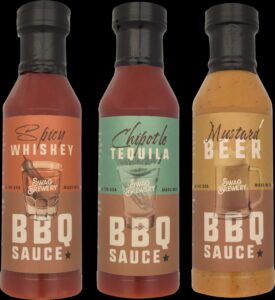


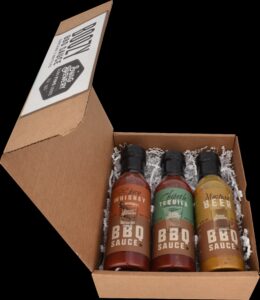
The Hidden Image Needs Brands Often Forget
- Mobile-first crops: your landscape hero shot won’t work on Stories — you need verticals
- A/B test variants: running paid ads without testing different creative is leaving money on the table
- Seasonal refreshes: the same product photographed against a holiday backdrop extends shelf life
- User-generated content supplements: real-customer images pair well with studio shots
Read more: DIY vs. Professional Product Photography
A Note on Quality vs. Quantity
More images is not always better. Ten mediocre images can hurt your brand more than three exceptional ones. Before budgeting for volume, make sure you’re investing enough in quality — great light, great styling, thoughtful retouching — to actually represent your product at its best.
When you’re ready to build a shot list, we walk every client through this channel-mapping exercise before a single light is set up. It’s worth the hour — it usually saves several thousand dollars in unnecessary shots.
Contact us to learn more.
Frequently Asked Questions
1. How many product images do I actually need per product?
There’s no one-size-fits-all number—but most brands benefit from a well-rounded set of images rather than just one or two. A complete set typically includes a hero image, multiple angles, and detail shots to fully showcase the product.
2. Is more product images always better?
Not necessarily. More images can improve conversions—but only if they add value. Too many repetitive or unnecessary images can overwhelm customers and waste your budget. The goal is the right mix, not just more volume.
3. What types of images should every product have?
At minimum, most products should include:
- A clean hero image on white
- Multiple angles (front, side, back, etc.)
- Close-up detail shots
- Packaging (if relevant)
Additional images like lifestyle or infographics can further enhance the listing.
4. Do I need different images for different platforms?
Yes. Platforms like Amazon, Shopify, and big-box retailers all have different requirements and expectations. Your image count and types should reflect where you’re selling.
5. How many images do I need for my website vs. marketplaces?
Marketplaces often require a structured set of images (hero + supporting angles), while your website allows for more creative flexibility like lifestyle imagery and branding visuals.
6. What happens if I don’t have enough images?
Too few images can create uncertainty for customers. Missing angles or details force shoppers to guess—leading to lower conversions and higher return rates.
7. Can I have too many images?
Yes. If images are redundant or don’t answer new questions, they can clutter your product page and dilute the impact of your strongest visuals. Strategic selection is key.
8. Should every product have the same number of images?
Not always. More complex products (with multiple features, textures, or uses) typically require more images, while simpler products may need fewer.
9. Do lifestyle images count toward my total image needs?
Absolutely. Lifestyle images are essential for showing scale, context, and real-world use—helping customers better understand your product and brand.
10. How do I decide what images I actually need?
Start with how and where your product will be sold. Then build an image list that covers:
- Platform requirements
- Customer decision-making needs
- Brand storytelling goals
11. Why does Skupics ask how many images I need upfront?
Because pricing is often based on image volume. Knowing your total image count helps the studio plan efficiently and give you the best cost per image.
12. Can I start small and add more images later?
Yes—but planning ahead is more cost-effective. Capturing all necessary images in one shoot saves time, avoids reshoots, and ensures visual consistency across your catalog.
13. How do I avoid overspending on images I won’t use?
Focus on strategy: prioritize essential angles and high-impact visuals first. Then add lifestyle or marketing images based on your actual content needs.
14. Do I need new images for every product variation?
In many cases, yes—especially for different colors, sizes, or styles. However, some variations can be handled efficiently with consistent setups or editing techniques.
15. What’s more important: quantity or quality?
Quality always comes first. A smaller set of high-quality, purposeful images will outperform a large set of inconsistent or low-impact visuals.